
I've been working on MCP apps for a while now, and I'm lucky enough to have shipped two Spotify production apps running inside ChatGPT and Claude! This got me interested since in building rich visual apps in Agent clients where it can provide a better experience for users. While browsing the agentic protocols landscape, I stumbled upon A2UI (Agent-Driven Interfaces), a new open-source protocol by Google that takes a completely different approach to agent UIs. Where MCP Apps give you full creative freedom inside a sandboxed iframe, A2UI goes declarative: agents send JSON describing UI components, and the client renders them natively. No arbitrary code execution, no HTML blobs, no trust issues... The agent says "here's a form" in JSON, the client draws it in Flutter, React, Angular, whatever it supports. A different philosophy, and I wanted to explore it.
Currently at v0.9.1 with v1.0 in RC, Apache 2.0 licensed, and already sitting at 16k+ stars on GitHub. In this post, we'll explore A2UI by building a Spring Boot MCP server that returns A2UI payloads from its tools, using Java 27, Spring Boot 4.1.1 and Spring AI 2.0.0. The whole thing is a single Java file. Let's dig in!
The bigger picture: Generative UI
A2UI is one of multiple initiative in the AI space within what's increasingly called Generative UI (GenUI) aiming to build UI that's generated or controlled by an AI agent at runtime, rather than hardcoded by developers. This is a space many are exploring right now, and it's moving fast!
Three flavors are emerging:
- Declarative (A2UI, Open-JSON-UI) where an agent sends JSON component descriptions, host renders natively.
- Sandboxed (MCP Apps), and here an agent triggers a full web app inside an iframe. What I use in production at Spotify.
- Controlled (AG-UI by CopilotKit) which is a bidirectional protocol for agent-frontend state sync. Acts as a transport layer that can carry A2UI payloads, MCP Apps, or custom UIs.
These aren't mutually exclusive. AG-UI can transport A2UI, MCP Apps can embed A2UI components, and A2UI can embed MCP Apps. The ecosystem is converging toward "use the right tool for the right layer" rather than one protocol to rule them all.
In this post, we're exploring the declarative flavor. Let's see how A2UI fits into MCP.
Why A2UI over MCP ?!
The Model Context Protocol already gives agents a way to call tools and get structured data back. But tool responses are typically text or images. A2UI adds a new superpower: MCP servers can return UI payloads using the application/a2ui+json MIME type as embedded resources. The client (Claude Desktop, Chatgpt mobile app, a custom agent host, whatever supports A2UI) renders the components natively.
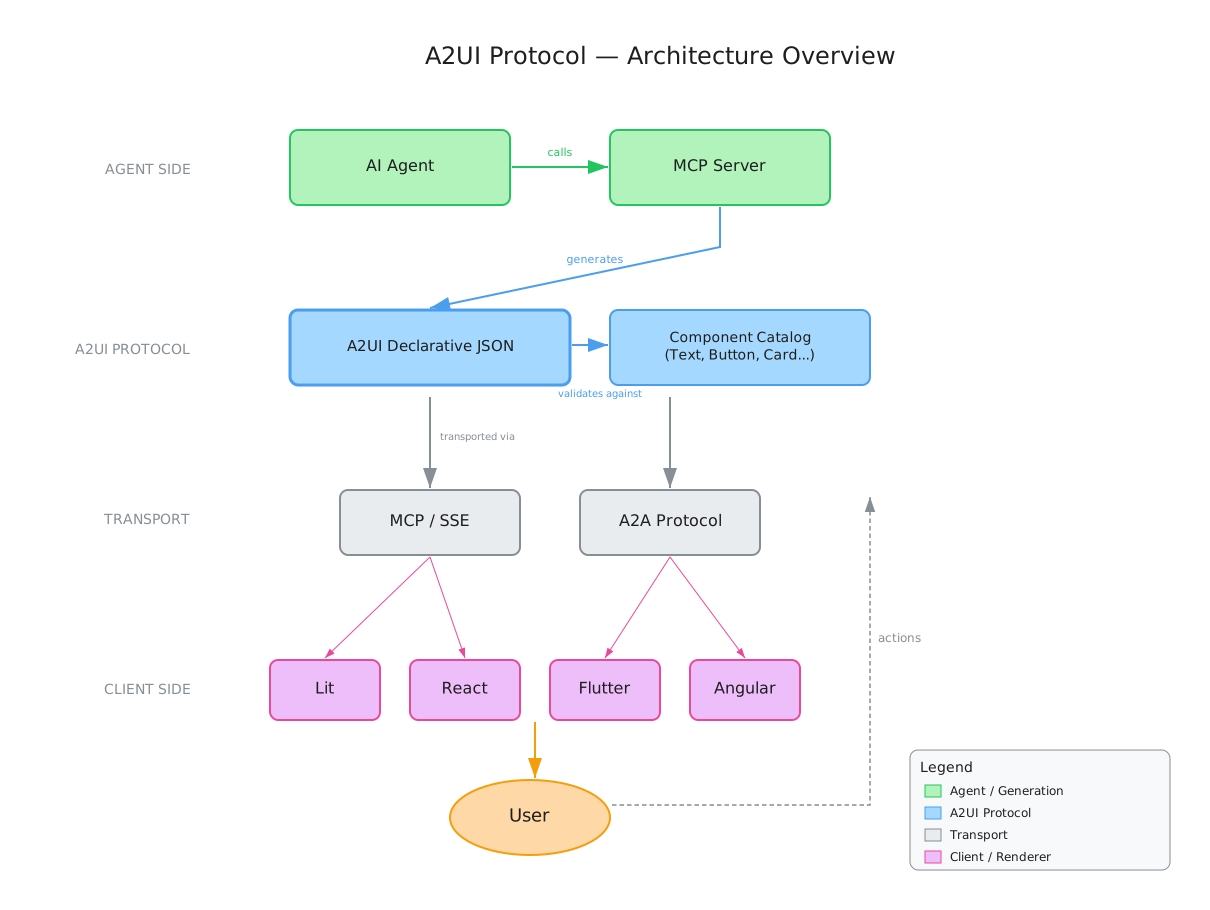
The security model is worth mentioning: A2UI is a declarative data format, not executable code. Agents can only use pre-approved components from a client-defined catalog. From a security standpoint, this is great. From a capabilities standpoint, it's a trade-off: you get native rendering and cross-platform portability, but you give up the full creative freedom that MCP Apps offer inside their sandboxed iframes. In a multi-agent world where tools from different trust boundaries exchange data, shipping JSON component trees instead of raw HTML or JavaScript is another tool in the bag.
Showtime
First off, we need a Spring Boot project with the Spring AI MCP server starter. The pom.xml looks like this:
<parent>
    <groupId>org.springframework.boot</groupId>
    <artifactId>spring-boot-starter-parent</artifactId>
    <version>4.1.1</version>
</parent>

<properties>
    <java.version>27</java.version>
    <spring-ai.version>2.0.0</spring-ai.version>
</properties>

<dependencyManagement>
    <dependencies>
        <dependency>
            <groupId>org.springframework.ai</groupId>
            <artifactId>spring-ai-bom</artifactId>
            <version>${spring-ai.version}</version>
            <type>pom</type>
            <scope>import</scope>
        </dependency>
    </dependencies>
</dependencyManagement>

<dependencies>
    <dependency>
        <groupId>org.springframework.ai</groupId>
        <artifactId>spring-ai-starter-mcp-server-webmvc</artifactId>
    </dependency>
</dependencies>
That single starter pulls in the MCP server runtime, SSE transport, and the annotation scanner. Nothing else needed. The application.properties is minimal:
spring.application.name=a2ui-mcp-demo
spring.ai.mcp.server.name=a2ui-mcp-demo
spring.ai.mcp.server.version=0.0.1
Now for the fun part. An MCP tool that returns A2UI is just a @Service with @McpTool:
@Service
public class A2uiTools {

    private static final String A2UI_VERSION = "v1.0";
    private static final String A2UI_MIME = "application/a2ui+json";
    private static final String CATALOG = "https://a2ui.org/specification/v1_0/catalogs/basic/catalog.json";
    private static final ObjectMapper MAPPER = new ObjectMapper();

    // A2UI messages as Java records — Jackson serializes them directly
    record A2uiSurface(String version, CreateSurface createSurface) {
        record CreateSurface(String surfaceId, String catalogId) {}
        static A2uiSurface of(String surfaceId) {
            return new A2uiSurface(A2UI_VERSION, new CreateSurface(surfaceId, CATALOG));
        }
    }

    record A2uiUpdate(String version, UpdateComponents updateComponents) {
        record UpdateComponents(String surfaceId, List<Map<String, Object>> components) {}
        static A2uiUpdate of(String surfaceId, List<Map<String, Object>> components) {
            return new A2uiUpdate(A2UI_VERSION, new UpdateComponents(surfaceId, components));
        }
    }

    @McpTool(name = "feedback_form",
             description = "Returns a rich feedback form UI")
    public CallToolResult feedbackForm() {
        var components = List.<Map<String, Object>>of(
            Map.of("id", "root", "component", "Column",
                   "children", List.of("title", "topic", "name_field", "submit")),
            Map.of("id", "title", "component", "Text",
                   "text", "Chaabia Mert Kebbour - Feedback Form"),
            Map.of("id", "topic", "component", "ChoicePicker",
                   "label", "Topic",
                   "options", List.of(
                       Map.of("value", "bug", "label", "Bug Report"),
                       Map.of("value", "feature", "label", "Feature Request")),
                   "value", Map.of("path", "/feedback/topic")),
            // ... more components
            Map.of("id", "submit", "component", "Button",
                   "child", "submit_label",
                   "action", Map.of("event", Map.of(
                       "name", "submit_feedback",
                       "context", Map.of(
                           "topic", Map.of("path", "/feedback/topic"),
                           "name", Map.of("path", "/feedback/name"))))),
            Map.of("id", "submit_label", "component", "Text",
                   "text", "Send Feedback!"));

        return a2uiResult("feedback", "a2ui://dynamic-ui/feedback-form", components);
    }

    private CallToolResult a2uiResult(String surfaceId, String uri,
                                       List<Map<String, Object>> components) {
        String payload = MAPPER.writeValueAsString(A2uiSurface.of(surfaceId))
            + "\n" + MAPPER.writeValueAsString(A2uiUpdate.of(surfaceId, components));
        return new CallToolResult(List.of(
            EmbeddedResource.builder(
                new TextResourceContents(uri, A2UI_MIME, payload)).build()),
            false, null, null);
    }
}
The pattern is pretty straightforward:
- Records (
A2uiSurface,A2uiUpdate) model the A2UI messages a2uiResult()builds the JSONL payload (createSurface+updateComponents) and wraps it in anEmbeddedResource- The MIME type
application/a2ui+jsontells the client "this is a UI, render it", not just data to display as text - Components are a flat list referencing each other by ID and the client take care of resolving the tree
The full source has a second tool (talk_card) that builds a conference talk Card with speaker avatar and room info.
How the flow works
Here's the full request-to-rendering lifecycle:
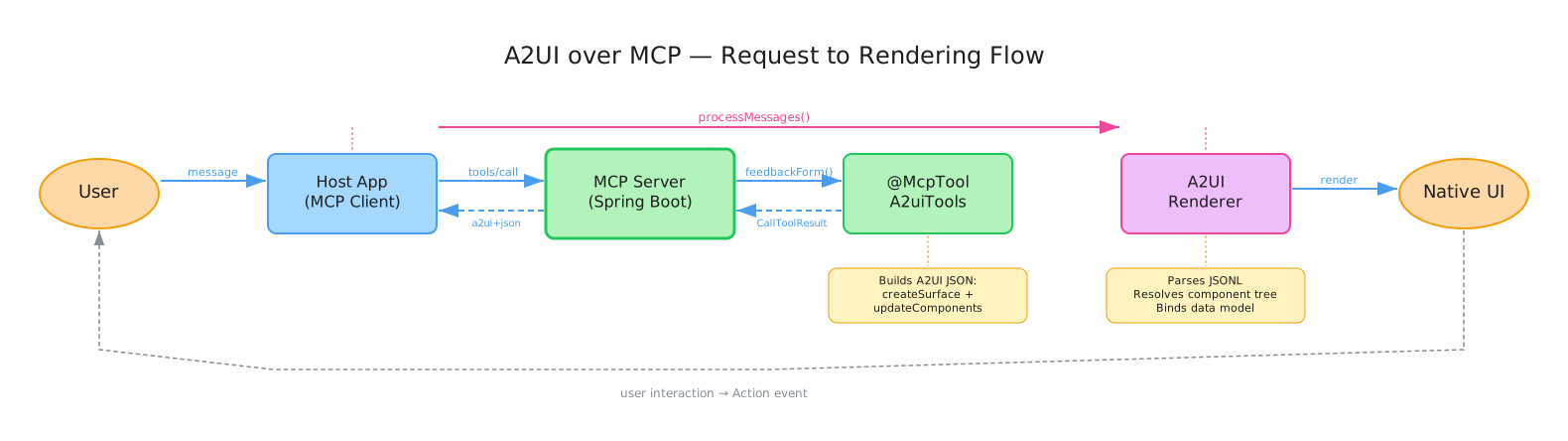
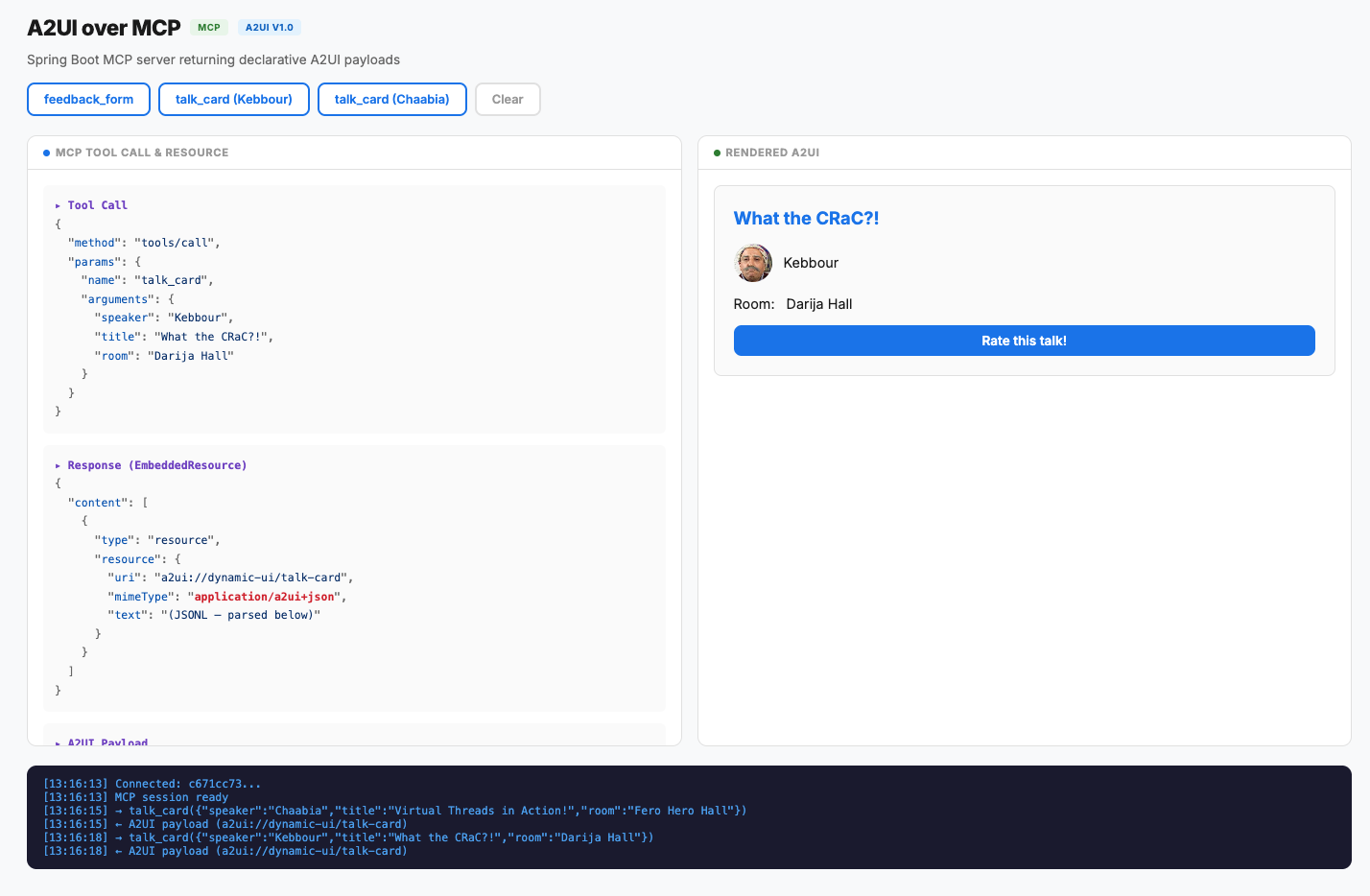
Now let's inspect the MCP server. The SSE endpoint lives under /sse, and after the handshake, calling tools/list returns our two tools with their schemas auto-generated from the @McpToolParam annotations. Calling the talk_card tool:
{
  "method": "tools/call",
  "params": {
    "name": "talk_card",
    "arguments": {
      "speaker": "Kebbour",
      "title": "What the CRaC?!",
      "room": "Darija Hall"
    }
  }
}
And the response comes back as an embedded resource with A2UI inside:
{
  "content": [{
    "type": "resource",
    "resource": {
      "uri": "a2ui://dynamic-ui/talk-card",
      "mimeType": "application/a2ui+json",
      "text": "{\"version\":\"v1.0\",\"createSurface\":{...}}\n{\"updateComponents\":{...}}"
    }
  }],
  "isError": false
}
Notice that the A2UI payload rides inline in the tool response, the actual content is right there in the text field of the EmbeddedResource. The uri field (a2ui://dynamic-ui/talk-card) is an opaque identifier. Coming from MCP apps world, that bit I don't necessarily align with, those components can also be defined in a resource to be fetched later. But latency is definitely an issue and one round-trip with everything inline is better.
And voila! The client gets a Card with the talk title, speaker avatar, room name, and a "Rate this talk!" button. All from a flat JSONL stream. Magic!
A2UI vs MCP Tools vs MCP Apps
So what is the difference between MCP (and the apps extension) vs A2UI? Here's how I see the three approaches side by side.
| MCP Tools (text/image) | MCP Apps (iframe) | A2UI (declarative JSON) | |
|---|---|---|---|
| Tool response | Plain text or images | Data (structuredContent) |
EmbeddedResource with application/a2ui+json |
| Who renders the UI | The host (as text) | Your bundled web app in an iframe | The host's native A2UI renderer |
| UI control | None! text only | Full! your own HTML/CSS/JS | Limited to the component catalog |
| Styling | N/A | You own it entirely | Host decides! We describe structure, not appearance |
| Interactivity | Zero (static text) | Full web app (OAuth, playback, drag & drop, WebSockets) | Form inputs, buttons, data binding, actions |
| Cross-platform | Works everywhere | Web only (iframe) | Native on Web, Flutter, iOS, Android |
| Security model | Safe (data only) | Sandboxed iframe (CSP, postMessage) | Declarative! no code execution at all |
| Setup complexity | Minimal | CDN bundle + widget build pipeline | Minimal! JSON in tool response |
| Offline / caching | N/A | Widget cached on CDN | Layouts can be cached as MCP Resources |
| Multi-agent safe | Yes | Risky (code from untrusted sources) | Yes! catalog enforces what's renderable |
| Ecosystem maturity | Production-ready | Production-ready (ChatGPT, Claude) | Early (renderers still growing) |
| Best for | Simple data exchange | Rich, branded, interactive experiences | Structured input, forms, cards, cross-platform UIs |
A few things worth calling out, in my opinion:
- MCP Apps and A2UI are not competitors. MCP Apps give you a full web app inside a sandbox, while A2UI gives you native components without a sandbox. Google even published a guide on combining both, embedding MCP Apps inside A2UI components for the best of both worlds.
- A2UI's biggest gap today is ecosystem maturity. The spec is solid, but renderer support is still early. There's no production host that renders A2UI natively yet (as of August 2026). The Lit and Flutter renderers work, but adoption is what will make or break this.
- A2UI's biggest strength is the multi-agent story. When agents from different organizations exchange UI across trust boundaries, declarative JSON is fundamentally safer than shipping executable code. This matters more as agent adoption grows.
- MCP Apps' biggest strength is the developer experience. You build a real web app with your own tools, your own design system, full interactivity. The trade-off is that it only works in hosts that support iframes (web-based clients).
Final Thoughts
A2UI is not a replacement for MCP Apps. It's a different tool for a different job. If you need a branded, interactive experience with authentication, playback, and full control over every pixel, MCP Apps are the way to go. If you need structured input, forms, or cross-platform UIs that render natively without shipping a web app then A2UI is compelling.
The Generative UI space is moving fast. A2UI, MCP Apps, AG-UI, each solving a different slice of the problem. The winners won't be the ones that try to do everything, but the ones that compose well with the rest. A2UI's declarative bet is that native rendering + security + composability beats flexibility. Time will tell if hosts agree :)
I'll be watching this space closely. Exciting times!
The full source code is on GitHub. Stay tuned ;)